For SRZ and local organisations
Fishing district notices, permit prices, points of sale and contacts
- Reading
- 9 min
- Steps
- 7
- Image
- 12
- Updated
- 18 Nov 2026
What anglers look for most often is whether the fishing district is open, how much a permit costs, where to buy one and whom to call. Only the organisation enters this information, which is why the fishing district editor has separate sections with fixed fields: notice type, date, price in euros, phone or a choice of person. It appears on the fishing district page straight away, labelled as entered by the organisation.
Notices and events
A closure, stocking, volunteer work day, competition or notice with a date
The Notices and events section is at the very top of the fishing district editor. A notice appears on the fishing district page from the “From” date and disappears by itself once it has ended, so you don't need to delete it.
How to add a notice or closure to a fishing district3 steps
Open the fishing district editor
In your profile, open the tab Organisation management next to the fishing district, press Edit. The Notices and events section comes first.
Save
Press Save changes. The notice appears on the fishing district page from the “From” date.
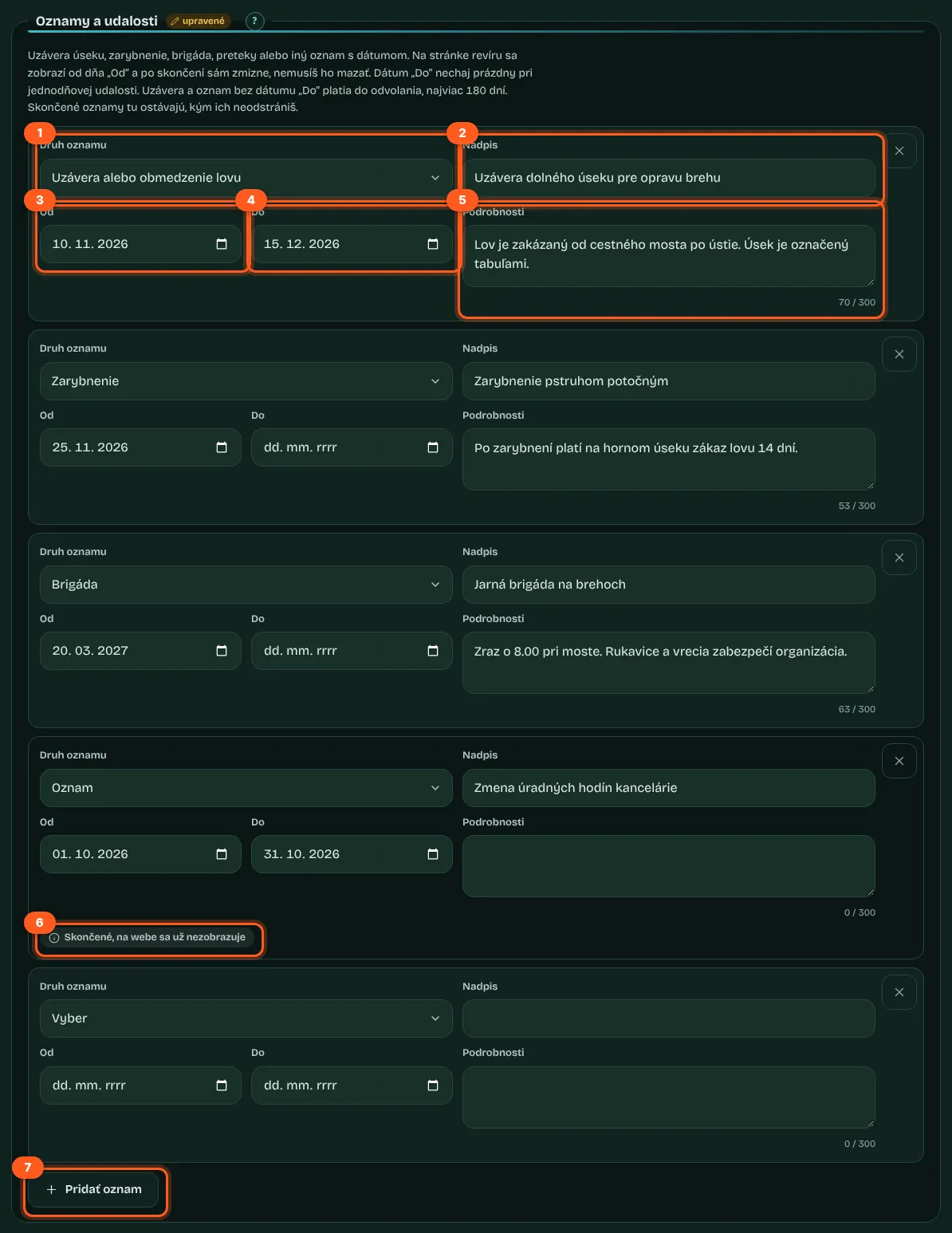
- Notice type
Fishing closure or restriction, Fish stocking, Volunteer work day, Competition or Notice. Each type has its own icon on the site.
- Title and Details
The title is required, up to 80 characters. Details are optional, up to 300 characters.
- From and Until
The “From” date is required. Leave “To” empty for a one-day event. “To” can't be earlier than “From”.
- Until further notice
A closure or notice without a “To” date is shown as “from … until further notice”, for up to 180 days from the start.
- Ended notices
Once they've ended, they're no longer shown on the site. In the fishing district editor, they stay at the end of the list with the tag “Ended, no longer shown on the site” until you remove them with the cross.
- Up to 20 notices
A fishing district can have up to 20 notices, including ones that have ended. So delete ended notices from time to time; the Data completeness panel will remind you about them.
- Competitions in search engines
A notice of the Competition type is passed to search engines as an event with a date and place, so they can show it in search results.

Permit prices and where to buy permits
Permit type, price in euros and points of sale
Permit prices
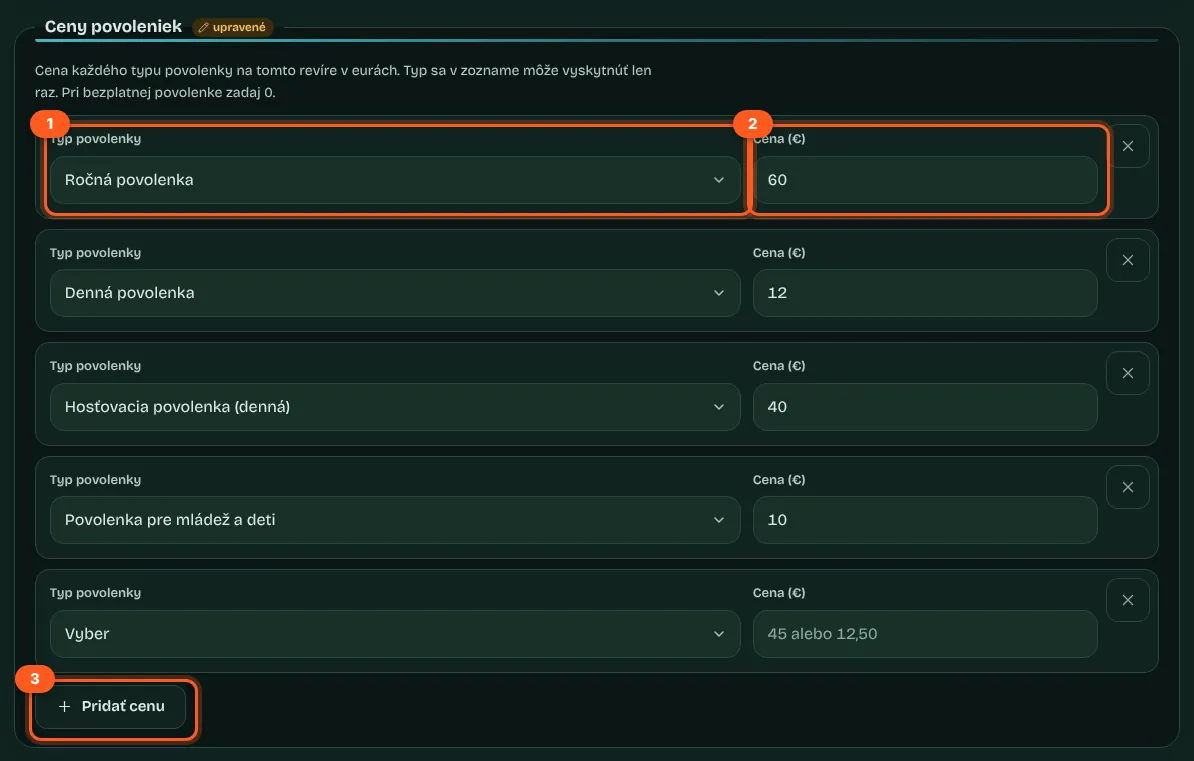
Choose the Permit type and enter the Price (€), for example 45 or 12.50 (up to 9,999.99). For a free permit, enter 0; the site will show “free”. Each type can only appear once in the list, so there can be up to 8 of them.
- Annual permit
- Monthly permit
- Weekly permit
- Day permit
- Guest permit (day)
- Guest permit (week)
- Junior permit
- Concession permit (pensioners, disabled anglers)
Where to buy a permit

- Point of sale name
Required, up to 80 characters: a shop, the organisation's office or an online shop.
- Address
Optional, up to 120 characters.
- Phone
Optional, 6 to 15 digits, for example +421,900,123,456.
- Website or online shop
Optional. Just type www.priklad.sk and the portal adds https://. The link is always saved as secure (https), even if you type http://.
Fishing district contacts
Choosing people from srzrada.sk and organisation contacts
Fishing district contacts aren't typed in by hand. In the Contacts section, you choose a person from the Person or organisation contact list. The list contains:
- officials listed for your organisation on srzrada.sk who have a phone number or email (name and role),
- the organisation's general contact (if srzrada.sk lists one),
- contacts the organisation has added itself, with the note “(added by the organisation)”.


The details are taken from srzrada.sk
The fishing district only stores which person you selected. The name, role, phone and email come from srzrada.sk, which the portal reads once a day. When a number changes there, it also changes on the fishing district page after the next update.
When a person disappears
If a person disappears from srzrada.sk or the organisation removes one of its contacts, they're no longer shown on the fishing district page.
Up to 6 contacts
You can select up to 6 contacts per fishing district. The same person can only appear in the list once.
There's no one to add yet
This message appears when srzrada.sk lists no one with a phone number or email for the organisation and the organisation hasn't added a contact of its own. Add one via Additional organisation contacts.
Additional organisation contacts
Fishery wardens, permit sales, work days and more
srzrada.sk usually lists only the organisation's leadership. You add fishery wardens, permit sellers, stretch fishery managers or youth club leaders on the organisation card. You then select them for a fishing district just like people from srzrada.sk.
How to add fishery wardens and other organisation contacts4 steps
Confirm consent and save
Tick the box confirming that the people know their details will be published and agree to it, then press Save contacts. You'll see “The contacts have been saved and are now shown on the organisation page.”
Select the contact for the fishing district
In the fishing district editor, the new contact appears in the list in the Contacts section with the note “(added by the organisation)”. Select it and save the fishing district.

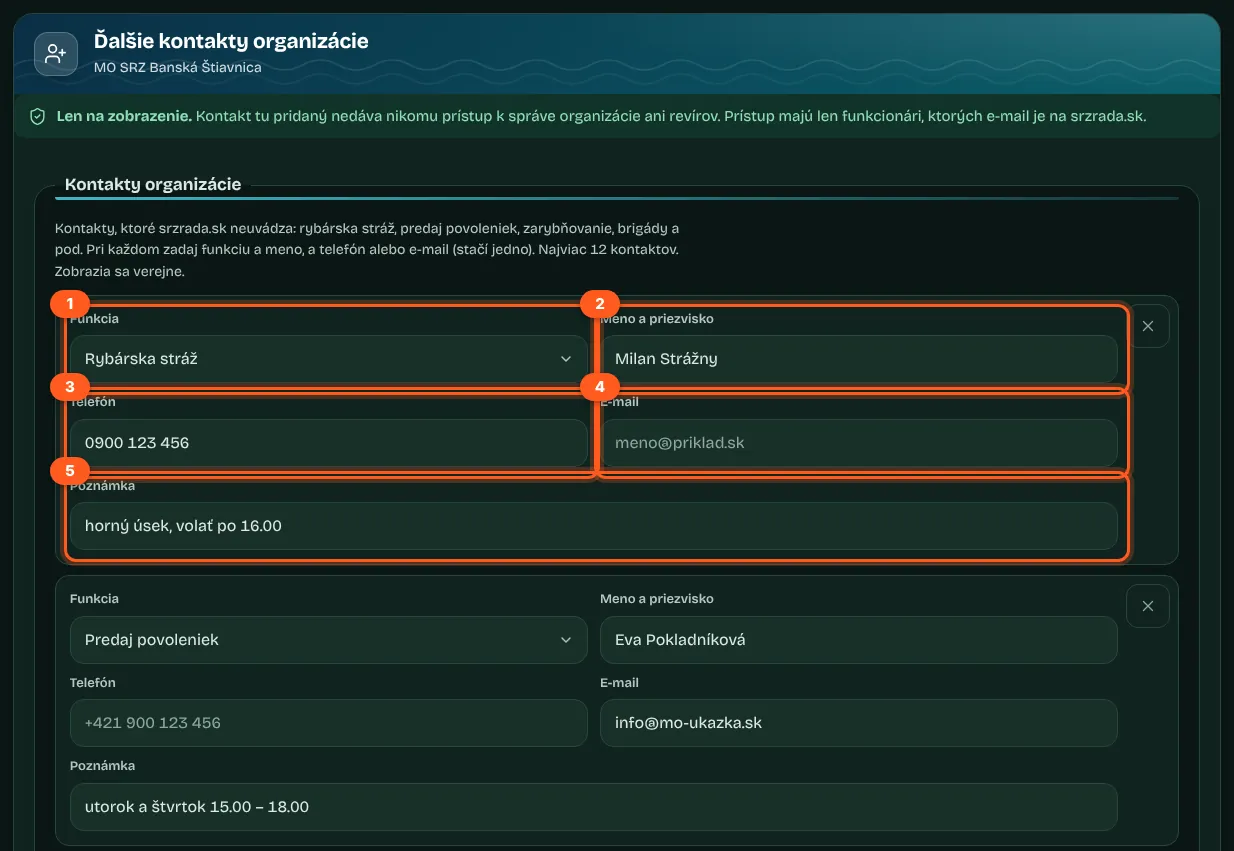
- Feature
Fishery warden, Fishery manager, Permit sales, Stocking, Work parties and events, Youth angling club or Other contact. For Other contact, you also enter a Role name (up to 40 characters).
- Full name
Required, 3 to 80 characters, no links or email addresses.
- Phone and Email
At least one of these is required. Enter the phone number in the format +421,900,123,456.
- Note
Optional, up to 80 characters, for example the stretch of the fishing district or the best time to call. The form won't accept links or email addresses in the note.
- Consent confirmation
Whenever you add or change a name, phone number or email, you must tick the box confirming that the people know their details will be published and agree to it. Without it, nothing is saved.
| Rule | Value |
|---|---|
| Maximum contacts per organisation | 12 |
| Maximum saves per hour | 20 |
| Where they appear | the organisation page (Additional contacts); the fishing district page and the bankside sign, if you select them for the fishing district |
| After removal | they disappear from the organisation page and from all fishing districts |
Further conditions of the fishing district
Night fishing, number of rods, hooks, keepnet, camping, fires, vehicle access
The additional conditions set for the fishing district aren't typed in as text; you choose them from a list. Anything you leave as Not specified isn't shown on the fishing district page.
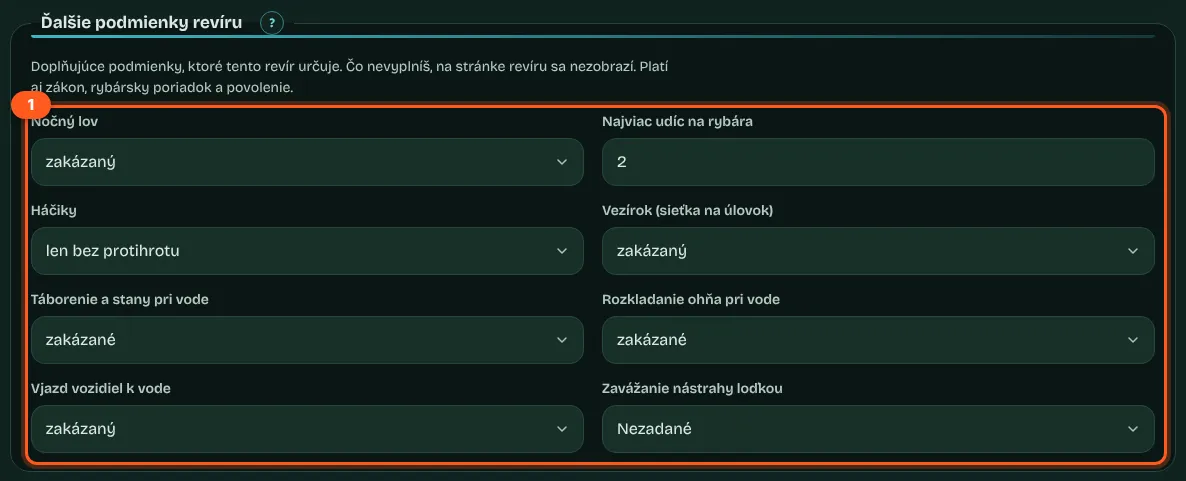
| Condition | Options |
|---|---|
| Night fishing | allowed, prohibited |
| Maximum rods per angler | a number from 1 to 10 |
| Hooks | barbless only, barbed hooks allowed too |
| Keepnet | allowed, prohibited |
| Camping and tents by the water | allowed, prohibited |
| Lighting fires by the water | allowed, prohibited |
| Vehicle access to the water | allowed, prohibited |
| Taking baits out by boat | allowed, prohibited |
What anglers see
Fishing district page, phone and bankside sign
Notices at the top
The Notices and events block is at the very top of the fishing district page whenever there's something to show. Current notices have the “In effect now” tag and future ones “Upcoming”; among current notices, closures come first.
Permits and contacts
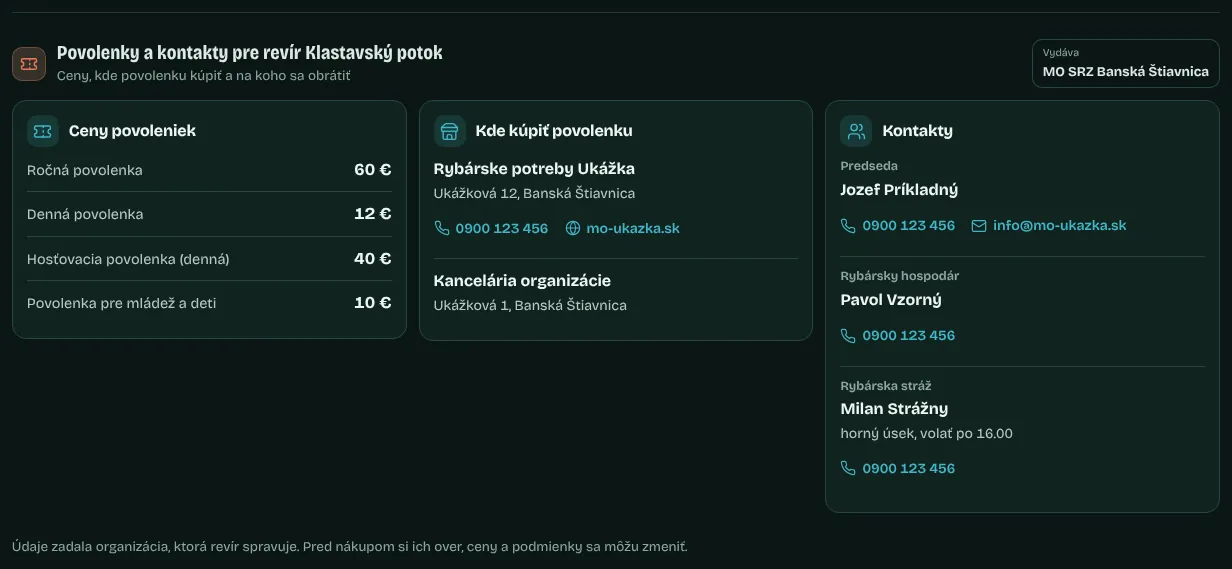
The Permits and contacts block shows prices, points of sale with call and website links, and contacts with call and email links. Below it, a sentence says the information was entered by the organisation and should be checked before buying.
Further conditions of this fishing district
A card in the rules section with the “set by the organisation” tag and the date of the last edit.
Email protection
Email addresses on the page are protected from bots that harvest addresses.
No machine translation
Texts from the organisation (notice titles, shop names, notes) aren't translated in the other language versions of the site; they stay in Slovak.
On the bankside sign
Current and upcoming notices, conditions, prices, points of sale and contacts are also printed on the bankside sign.


Frequently asked questions
7 questions with short answersQuestions7
Do I have to delete a notice once it has ended?
No. Once it has ended, it no longer appears on the site. It stays in the fishing district editor until you delete it; one fishing district can hold 20 notices.
How do I enter a closure if I don't know yet when it ends?
Choose the Fishing closure or restriction type and leave the To date empty. The site will show “until further notice”, for up to 180 days.
Why can't I type in a fishing district contact by hand?
So that the fishing district page never lists someone who isn't part of the organisation. You choose people from srzrada.sk or contacts the organisation has added on the organisation card.
The chair's phone number has changed. Do I have to update it?
No, as long as the number has been corrected on srzrada.sk. People's details are taken from srzrada.sk at the next daily update.
Does adding a fishery warden as a contact give them management access?
No. Additional contacts are for display only. Only officials whose email is on srzrada.sk have access.
How do I enter the same permit prices for all fishing districts?
Use Bulk edit on the organisation card: select the fishing districts, choose Add or Replace the whole list under Permit prices, and save.
How many notices are printed on the bankside sign?
Up to 4: first those in effect now (closures first), then upcoming ones. Anglers find the rest by scanning the QR code.
No question was found for this search.
Related guides
Where to go next once you have read this
- Fishing district managementEditing fishing district data step by step: minimum sizes, stocking, rules, characteristics, data completeness and change history with undo.13 min · 8 steps · 13 screenshotsFor SRZ officials
- Bulk editA volunteer work day, new permit prices or the chair's contact details for all your fishing districts in a single save, with a preview and the option to revert.7 min · 10 steps · 11 screenshotsFor SRZ officials
- Bankside signAn A4 poster with a QR code linking to the fishing district's current data: printing for one fishing district or the whole organisation, ink-saving print and a scan counter.6 min · 4 steps · 6 screenshotsFor SRZ officials
- Fishing district pageThe header and four indexes, widgets from conditions to geology, searching the page, organisation notices, navigation and sharing.17 min · 13 steps · 14 screenshots
More guides: For SRZ and local organisations
Organisation and fishing district management for MO and MsO SRZ officials
- Access for officialsHow you get access to organisation management: email from srzrada.sk, registration, email verification, suspension and removal of access.12 min · 5 steps · 7 screenshotsFor SRZ officials
- Map and layersDrawing the location of a fishing district that has no official location, and practical places on the map: fishing bans, parking, water access, camping, stocking.10 min · 10 steps · 11 screenshotsFor SRZ officials
- Fishing district structureA fishing district under the wrong organisation or the wrong river, missing or abolished: proposing a change, its status and approval by the portal administrator.7 min · 5 steps · 9 screenshotsFor SRZ officials
- Organisation pageThe organisation's public page: contacts, fishing districts, news from RSS, competitions and the “added by the organisation” badge on fishing district pages.6 min · 10 screenshotsFor SRZ officials